Rail alignemt vertical / horizontal

Don't know how to use a machine? Looking for efficient setups? Stuck in a mission?
Quax
Fast Inserter
Fast Inserter
Posts: 112
Joined: Mon Mar 14, 2016 7:57 am
Contact:

Rail alignemt vertical / horizontal

Post by Quax »

I don't know if I'm doing something wrong. When having a blueprint that includes rails, I cannot simply rotate the blueprint. If constructed in one way (eg. horizontal), its of by one tile when rotating. This is incredibly annoying, and I cannot believe this is the built-in behavior. So obviously I'm doing something wrong, but I cannot find out what.

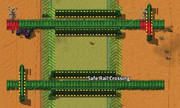
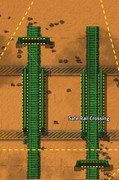
As you can see in these images. When placed vertically, the blueprint aligns perfectly with the given grid. Horizontally - nope (see the concrete part of the blueprint). (The refeined hazard concrete builds exact squares 100 x 100 tiles)
Image

Image

Any help is appreciated.
Loewchen
Global Moderator
Global Moderator
Posts: 10676
Joined: Wed Jan 07, 2015 5:53 pm
Contact:

Re: Rail alignemt vertical / horizontal

Post by Loewchen »

I don't see a difference, they are equally offset in both vertical and horizontal rotation because of the 2x2 rail grid.
Tertius
Smart Inserter
Smart Inserter
Posts: 1583
Joined: Fri Mar 19, 2021 5:58 pm
Contact:

Re: Rail alignemt vertical / horizontal

Post by Tertius »

Move one of the concrete lanes 1 tile to the outside or to the inside. It's probably not equidistant to the center but instead 1 tile mismatched.
Quax
Fast Inserter
Fast Inserter
Posts: 112
Joined: Mon Mar 14, 2016 7:57 am
Contact:

Re: Rail alignemt vertical / horizontal

Post by Quax »

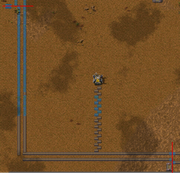
Nope, unfortunately none of the above. I now rebuilt this and found out, that rails actually really do have a different horizontal and vertical alignment. I buildt an exact 100x100 tiles square with belts and created the middle of each side with two lines of 50 belts each. As you can see, the middlle line of the horizontal rail aligns exactly with the middle between these two 50-belt-lines, whereas the vertical rail aligns to the middle between the two belts with its side. Thus, rotating a blueprint with rails in it is not possible.

Image

I guess I need to have all blurprints without rails to make them rotatable.

*Shrug* Weird design concept anyway.
Nidan
Filter Inserter
Filter Inserter
Posts: 356
Joined: Sat Nov 21, 2015 1:40 am
Contact:

Re: Rail alignemt vertical / horizontal

Post by Nidan »

Shift everything except for the rails one tile to the left and everything will line up properly.

As the others have already mentioned, rails align on a 2x2 grid. So, if you are designing a blueprint that includes rails, start with the rails (or at least put a rail on top of the planned rotation point) or be prepared that you might have to move everything else by one tile along one or both axes to conform to the rail grid.
Quax
Fast Inserter
Fast Inserter
Posts: 112
Joined: Mon Mar 14, 2016 7:57 am
Contact:

Re: Rail alignemt vertical / horizontal

Post by Quax »

Ahhh!!! I see. Thanks ...
Tertius
Smart Inserter
Smart Inserter
Posts: 1583
Joined: Fri Mar 19, 2021 5:58 pm
Contact:

Re: Rail alignemt vertical / horizontal

Post by Tertius »

You have a weird spacing, but I guess this is what you're trying to achieve. Rotates and mirrors perfectly. Mirror only possible of course without rail signals.
03-07-2026, 11-31-23.png
03-07-2026, 11-31-23.png (667.5 KiB) Viewed 33 times
Post Reply

Return to “Gameplay Help”